Showing posts with label digital illustration. Show all posts

Saturday, March 5, 2022

Custom T-Shirt Illustrator Vector Art Ideas For International Women's Day


Do you know what magic can vector illustration exhibit? Have you ever wondered how beautifully different points of a triangle or rectangle can come together to create an inspiring structured image? In simple terms, geometrical shapes are printed on different types of fabrics in the form of digital illustrations. Just think of one such image embroidered on your apparel? Think of one such embroidered piece of t-shirt customized for Women's day?

Yes, a day of love is coming with lots of love and a fresh breath of air. So, what are your plans for Women's day? What are the choices of gifts you have? How does a custom couple t-shirt embroider with the most exciting and heart-warming design sound? That’s certainly a surprisingly inspiring gift idea for International Women's day special gift.

Check out our latest products :                                                                                                                                                                


Digital illustration in the field of custom embroidery designs has gained immense popularity in recent years. Today it has become the most exciting source of inspiration for the garment industry with new heights of visual interpretation integrated with inventive graphical directions. Let us now understand what can be the best ideas to explore for a perfect valentine's delight with custom couple t-shirts. Here are some of the best t-shirt illustrator vector art ideas:

  • Geometrical Patterns: These are the most common vector illustrations that can be customized on a t-shirt with a wide variety of vector graphics, textures, gradients, and techniques. The innovative use of circles and rectangles can deliver a vintage look to the final printed image. 


  • Creative Lettering: Lettering vector illustration can be another choice of idea when you think of gifting a custom couple t-shirt as a gift of love. You can choose to have either the names or initials on the apparel and then wear each other names in the most creative manner.


  • 3D Compositions: These are created in their own unique style with complementing colors used along with 3D digitizing techniques like shading and gradients.

  • Animal Vector Art: When it comes to gift ideas, even animal vector illustrations can prove to be a wonderful idea on a couple of t-shirts. You can choose an animal figure that may be the symbol of respective birth signs or you can choose the animal vector that you like the most.                      


  • Love Birds Heart: What can be more expressive than a love bird's vector illustration on your t-shirts? This serves as the best icon of love and makes you easily express the intensity of your love.                                                     


  • Floral Patterns: Floral patterns are the most popular way to say how much you love them. Showcase the same depth of love through vector illustration of floral patterns in futurist color combinations and textures.                                   


  • Floral Kaleidoscope Heart: A soothing embroidery design to be printed on t-shirts for a perfect gift of love. It can be created with shades of pastel colors and creative gradients for a fulfilling design piece.                                           


There are many more choices available for a perfect illustrator vector idea for this valentine. We do understand how important a valentine's gift is for you and so we do understand the importance of your embroidery requirement. We have the best of technologies encompassing all hardware and software solutions put to functioning by our expert team that also includes some of the best Indian and USA digitizers.

So, get connected to have an abundance of gift choices when you are all set to express your feeling of love this International Women's Day. What we at Cre8iveSkill ensure is high quality with whatever we deliver.  

Source: https://www.cre8iveskill.com/blog/custom-t-shirt-illustrator-vector-art-ideas-international-womens-day-special

Saturday, February 27, 2021

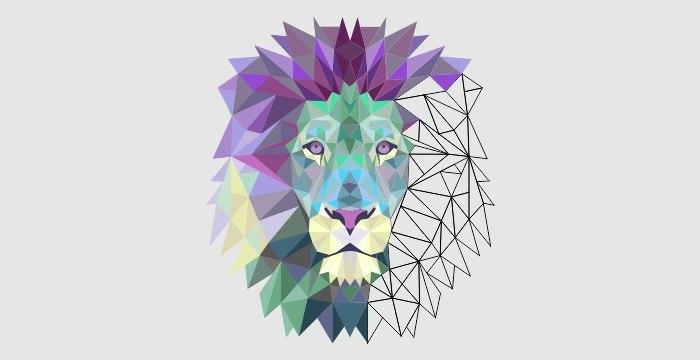
Vector Graphic Designs Of Polygonal Animal : Digital Illustration


Have you ever wondered about the art that brings numerous triangles or rectangles together to create a beautifully structured image? It is called low-poly art. The art is said to have derived from the 3D models shown in the video games. It is nothing but a digital illustration of vector images and looks cool when those geometrically shaped images are printed on apparel and other fabric.

The digital illustration of animal vector graphics is an interesting art and has gained immense popularity lately. Let us understand how to create a low poly art using Adobe Illustrator. Although the process requires dedicated practice, it is worth investing the time.

STEP 1: IMPORT THE IMAGE

Open a new document in Adobe Illustrator and click on import to open your desired image file. Before proceeding, ensure that the image is free from any watermarks. Then, select Create A New Layer from the Layers tab which will differentiate the low-poly illustration from the source image.

STEP 2: USE THE PEN TOOL TO CREATE GEOMETRIC SHAPES


The Pen tool is used to create geometric shapes. It is always advisable to highlight the image path with a brighter color in order to distinguish it. By setting the opacity to 50%, you will be able to see the image that you are tracing. You can set the transparency level on the right-hand side of the Illustrator. Now, start creating polygonal shapes using the Pen Tool. While doing so, keep Snap to Point and Smart Guides enabled in the drop-down menu of the View tab. This ensures there is no gap between the polygons. Also, you need to make sure not to draw any curves and focus on creating straight lines in order to achieve that low-poly effect. Here are a few tips to bring out a flawless polygonal structure:   

  • Try to draw more shapes and points as this will give a more complex and detailed view of your illustration.
  • Focus on different color sections and draw shapes based on those.
  • Avoid creating identical shapes.
  • Try to create polygons having not more than five or six sides.
  • In areas of detail, it is good to draw small polygons while larger ones can be drawn for other areas.
  • Make sure to draw shapes that are closed and attached to the neighboring polygons.
STEP 3: CHECK THE ALIGNMENT OF POLYGONS

After completing your illustration, check the entire shape to ensure there are no gaps. Use the Selection Tool to select all your shapes and toggle the stroke icon present on the left-hand side of the program with X. Then press / to alter the stroke color to none. You get a clear image of your illustration on bringing the opacity to 100% and find if there are any holes in the design. In case there are any holes, you can manipulate them individually by using the Direct Selection Tool.

STEP 4: COLOR THE SHAPE

Once you have connected all your shapes, it is time to fill them up with color and this is the most fun part of the low-poly designs. Vector art conversion into a geometrical structure is an amazing experience. To add color to the shapes, select them using the Selection Tool, and clicking Shift+X. To simplify the process of coloring, you can sample the colors from the original image source using the Eyedropper Tool. It can be found on the left-hand side toolbar. First, you will have to select the Eyedropper Tool following with selecting the most prominent background color from the source. If you wish to use your own color combinations, you can manipulate the sliders present under the Color tab present on the right-hand side of the Illustrator program. It is best to avoid using similar colors to each other. To highlight, you can use shades of black or white or any contrasting color.


STEP 5: ADD THE FINISHING TOUCHES


Hide layer 1 and select layer 2 while removing the stroke. Your low-poly image is ready. Photo digitization is an amazing artwork that brings out a classic piece that can be further used for digital printing on various materials.

Online vector art conversion is fun and can be easily done following the above steps. However, if you wish to have a multitude of vector graphics converted to low-poly designs, we suggest hiring a professional company that has a team of professional digital artists.  Cre8iveSkill possesses extremely skilled professionals to accomplish illustrator services for you.  You can reach out to us at +91-91300 10350 for further inquiries.
                                     

Source: https://www.cre8iveskill.com/blog/digital-illustration-polygonal-animal-vector-graphics